VTOKU Cam can stream the camera's 6-DoF pose to two protocols at once, VMC/OSC and FreeD, both phase-locked to the ARKit frame rather than a timer, so motion stays tight with the pose. Pose is always reported relative to the fixed world anchor.
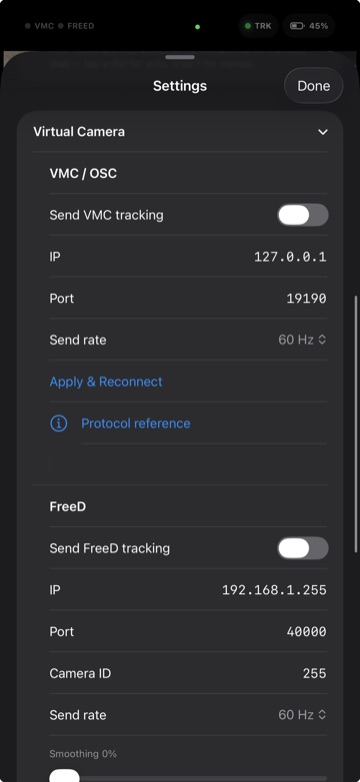
VMC / OSC
VMC over OSC is the protocol used by Warudo and most VTuber tools.
- Enable VMC/OSC under Senders.
- Set the destination IP and port to your receiver. Default send
port is
19190. - Messages include
/VMC/Ext/Cam(camera transform + FOV), root position, and lens data.
For the full Warudo walkthrough, see Connect to Warudo.
FreeD
FreeD is the broadcast camera-tracking protocol used by many virtual-production and broadcast systems.
- Enable FreeD under Senders.
- FreeD is sent as a 29-byte D1 packet over subnet UDP broadcast, default port
40000. - Axis mapping: X = right, Y = forward, Z = height; values are scaled and checksummed per the FreeD spec.
Broadcast networks: some Wi-Fi networks block broadcast or isolate clients. If your FreeD receiver sees nothing, try a dedicated router/AP and disable "AP isolation" / guest mode.
Running both at once
VMC and FreeD can be enabled together, for example, drive an avatar in Warudo over VMC while a separate system consumes FreeD camera data. Both read the same per-frame pose.
Lens & FOV
The app derives real field-of-view from the device camera intrinsics, and you can adjust focal length with the Lens controls. FOV is included in the VMC camera message so your virtual lens matches the phone.
Send face tracking
Separately from the camera, VTOKU Cam can stream on-device face capture to your PC. In Settings › Motion, turn on Send Face Tracking. It sends over VMC and is compatible with iFacialMocap receivers, so tools like Warudo and VSeeFace can read it.
- Send to the same destination as the camera, or set a custom IP and port when your face receiver lives on a different machine.
- To capture and tune the face on the device first, see Avatars & faces.
Next: NDI in & out →