VTOKU Cam renders a VRM avatar in AR with a cel and toon look, live lighting, and ground contact shadows. You can drive its face from the device, drive its face and body from any VMC app on your network (Warudo, Movin Studio, and others), and play built-in idle and dance motion. On-device full-body tracking is coming soon.
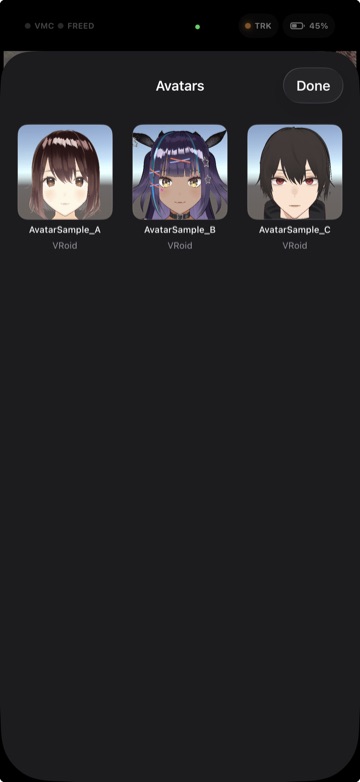
Import your own VRM
- Copy your
.vrmfile onto the device with AirDrop, iCloud Drive, or the Files app. - In VTOKU Cam, open the Avatars sheet and select your model.
- Place it in your space. See Getting started.
Make sure you have the rights to any avatar you import and use, especially for commercial or public broadcasts. You own and control the files you import; VTOKU never receives them.
Drive the avatar over VMC
VTOKU Cam can receive a body and face performance over VMC and apply it to the
avatar on the phone. It listens on UDP port 39539, the same default that Warudo's VMC
receiver uses, so any VMC source on your network can drive the avatar. Point the sender at your
phone's IP on port 39539. While a VMC feed is live it overrides on-device face capture
by design.
- Warudo, add a VMC Sender targeting the phone's IP on
39539. See Connect to Warudo. - Movin Studio, enable VMC streaming and set the destination to your phone's IP
on port
39539(in place of the usual127.0.0.1Warudo address). See Movin's VMC streaming guide. To layer Movin's motion with a Warudo scene, send Movin into Warudo and let Warudo forward VMC to the phone instead. - Other VMC apps (VSeeFace and similar) work the same way: aim their VMC output
at the phone's IP on
39539.
The cel look
Avatars render with a cel / toon shader for a clean anime-style result, with live lighting that responds to the room (key-light direction and warmth estimated from the AR scene) and soft ground contact shadows under the feet.
The avatar can also be hidden behind real-world objects and defocused like a real subject. See occlusion, depth of field, and the Screen FX grade in Look & camera.
Face tracking
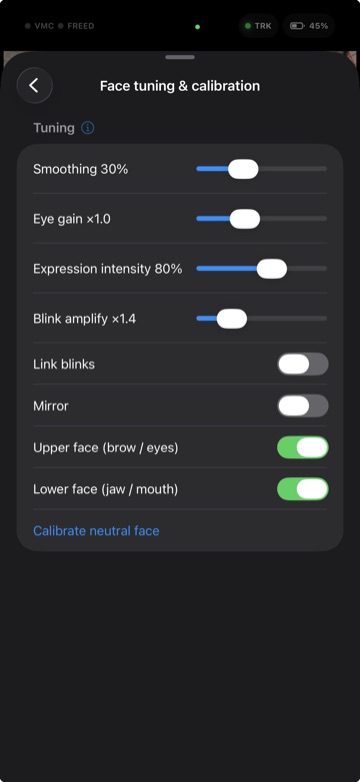
Turn on Face tracking under Settings › Motion, then pick the face source:
- On-device, the front TrueDepth camera drives the face with ARKit blendshapes.
- VMC, a Warudo (or other VMC) feed drives the face from your PC.
- iFacialMocap, receive face data from an iFacialMocap sender on the network.
For on-device capture, tap Calibrate neutral face with a relaxed expression so the avatar rests correctly. ARKit blendshapes map to the avatar two ways:
- Perfect-sync, if your VRM ships custom expression clips named after the ARKit blendshapes, the app drives the full set by name.
- Basic, otherwise it maps to the standard VRM expression presets.
- VMC override, when a VMC feed is live, its face data takes over from on-device capture.
If your face leaves the front camera's view, the avatar eases back to a neutral expression instead of holding the last frame, then picks your face up again when you return.
You can also send the captured face out to other tools (iFacialMocap-compatible). See Send face tracking.
Idle & dance animation
When no external motion source is driving the avatar, she plays a living idle: a relaxed standing pose with natural hand shapes, a slow weight shift, and an upper body that sways toward wherever she is looking, so she reads as present rather than frozen.
You can also play built-in VRMA dance clips, or bring your own with Import animation (.vrma) on the Avatars sheet. Imported clips stay on the device and join the same picker as the built-in ones.
Troubleshooting
- Model won't load: the file may be malformed or use an unsupported VRM feature, try re-exporting from your avatar tool.
- Face not moving: confirm a TrueDepth device, the camera permission, and that no Warudo VMC feed is overriding the face.
Next: Look & camera →